
Worker Manual
Essential information and tools for working with MattyJacks. Please review this guide carefully.
IRS Forms
All international contractors must complete IRS Form W-8BEN to establish tax status. This form certifies that you are a foreign person and helps determine the correct amount of tax withholding. Please follow these steps:
Step 1: Reference Official Form
Download the official IRS W-8BEN form for reference
Step 2: Sign PDF Online
Use Adobe's free online tool to sign your form
Time Tracking with Toggl
Toggl Track is a simple time tracking tool that helps you log your work hours accurately. It allows you to start and stop timers for different tasks, categorize your work, and generate detailed reports. We use Toggl to ensure accurate billing and project tracking.
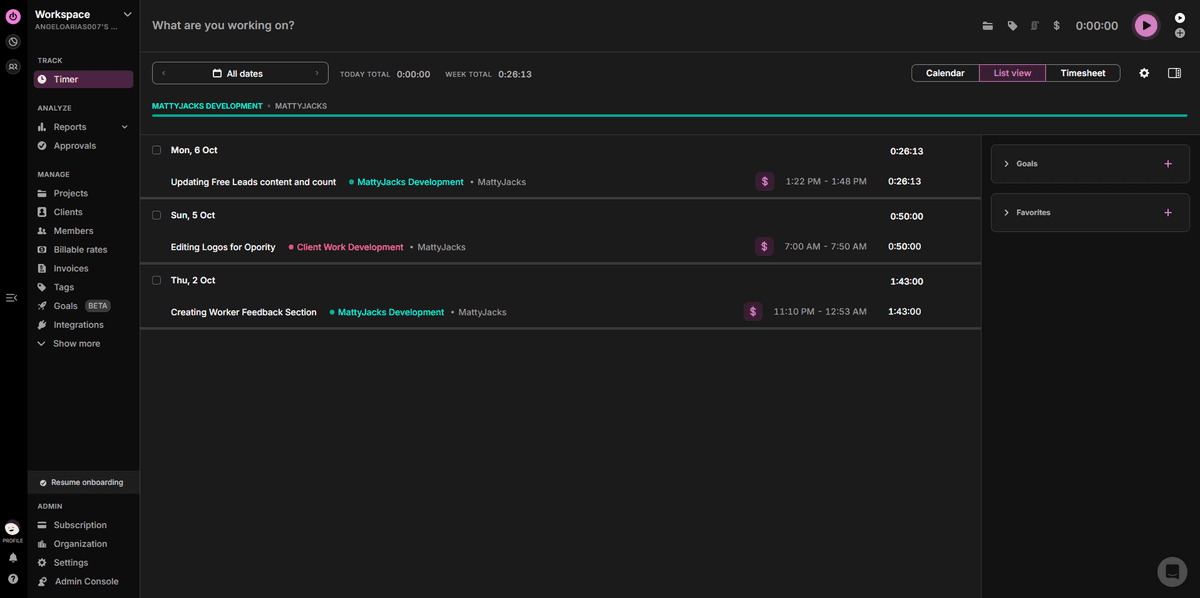
List View
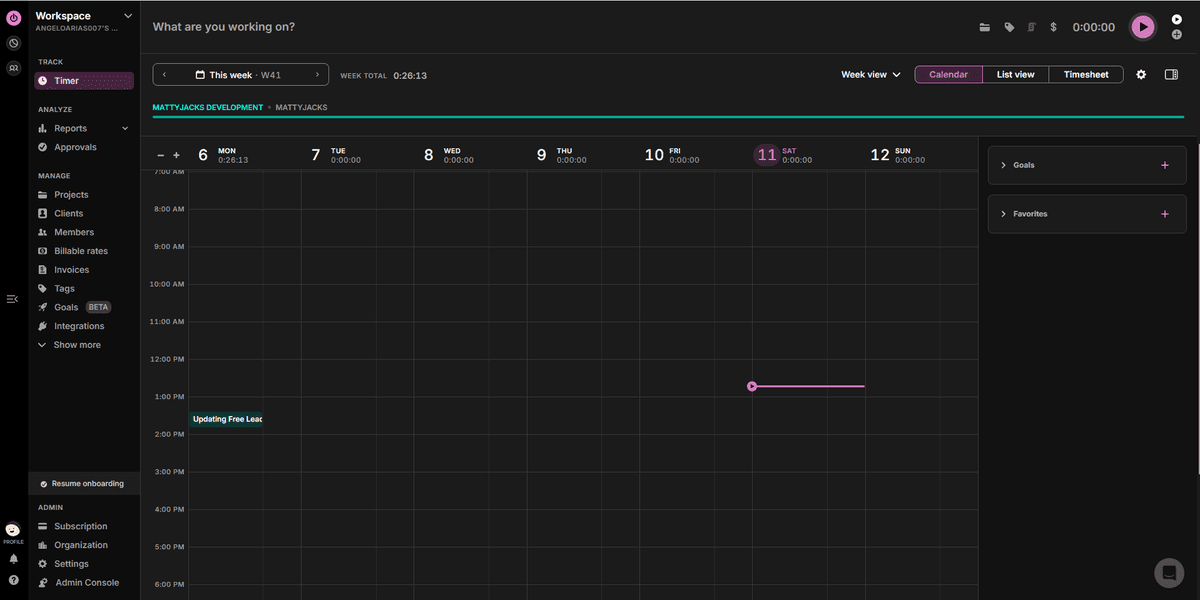
Calendar View
✓List View (Recommended)
Shows your time entries in a clean, organized list format. Easier to review, edit, and verify your logged hours. This is the preferred view for accuracy.
Calendar View (Default)
Displays time entries on a calendar grid. While visually appealing, it can be harder to spot errors or review detailed entries. Switch to List View for better clarity.
How to Switch Views
Log into Toggl Track, open the Timer/Track page, and click the List view or Calendar button at the top-right of the time-entries area.
Invoices
Note:
We have ceased issuing invoices for transactions that are not related to LTC. Invoices are necessary for LTC transactions.
Purpose
All invoices are created and sent using invoice.mattyjacks.com. This process ensures timely and accurate payment tracking.
Using the Platform
Visit invoice.mattyjacks.com. Fill in all required invoice details, including the work done, total hours, and amount due.
You must also provide your full legal name when submitting your invoice. This is required for payment records and government compliance, especially for U.S.-based contractors.
If your total earnings from Matty Jacks are projected to exceed $600 USD in a calendar year, you'll be required to fill out a tax-related form (e.g., Form W-9) for U.S. tax reporting purposes. The admin team will reach out when this is needed.
Generating the Invoice Email
Once your invoice is submitted, the platform will generate:
- Email Subject Line – click "Copy Email Subject"
- Email Content – click "Copy Email Content"
These must be used exactly as generated. Do not change the format, subject, or message body.
Sending the Invoice
Send the invoice email to the address shown under "Email Being Invoiced" (usually: mattyjacks11@gmail.com).
- Paste the copied subject into the email subject line.
- Paste the copied content into the email body. Send using your official work email only.
For Crypto Payments
If you choose to receive payment in crypto:
- Double-check your wallet address before submitting.
- Once sent, crypto payments cannot be reversed.
- Make sure your preferred coin/token is supported by the client.
Any incorrect wallet address will result in permanent loss of funds. You're responsible for ensuring the address is accurate.
Communication
Purpose
We use Discord as our main communication platform. It's where task updates, team coordination, and announcements happen in real time.
Getting Started
You'll be invited to our official Discord server after onboarding. This server includes channels organized by tasks, roles, and teams. Make sure you've accepted the invite and joined the server before your first working day.
Communication Guidelines
- If you have questions, post them in the correct server channel (e.g., #content-team, #admin-tasks, etc.)
- For urgent concerns or unclear assignments, ping @MattyJacks or your assigned manager directly in the thread or channel where the task was posted.
- Keep conversations task-focused and professional within work channels.
- Use threads for updates or follow-ups on specific tasks to keep things organized.
Reminders
- ✓Always check Discord before and during your shift
- ✓Update your status if you're stepping away or done for the day
- ✓Tag the right people when clarification is needed
- ✓Stay in your assigned channels and respect role boundaries
- ✓Refer to pinned messages or announcements for ongoing instructions
FAQs
Important: The freelancer is an independent contractor, not an employee. You are responsible for your own taxes, insurance, and business expenses.